1、下载镜像
docker pull seataio/seata-server:1.8.0

2、创建临时容器
docker run -d --name seata seataio/seata-server:1.8.0

3、复制配置文件
# 创建seata配置文件目录
mkdir -p /server/seata

# 拷贝容器内的配置文件
docker cp seata:/seata-server/resources /server/seata

- 拷贝后的文件目录
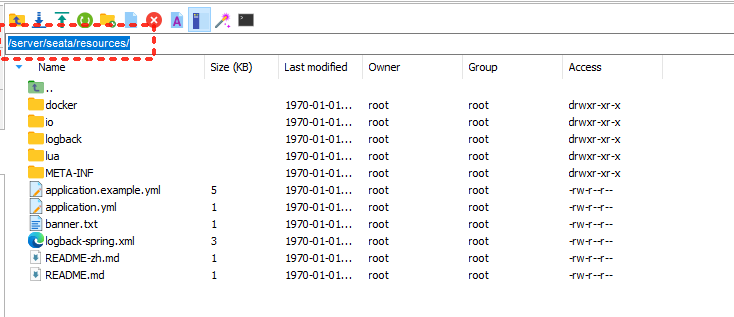
4、删除临时容器
# 删除临时容器
docker rm -f seata
5、在nacos中加配置文件
在nacos中创建配置,取名为seataServer.properties(注意下面配置内容是properties)
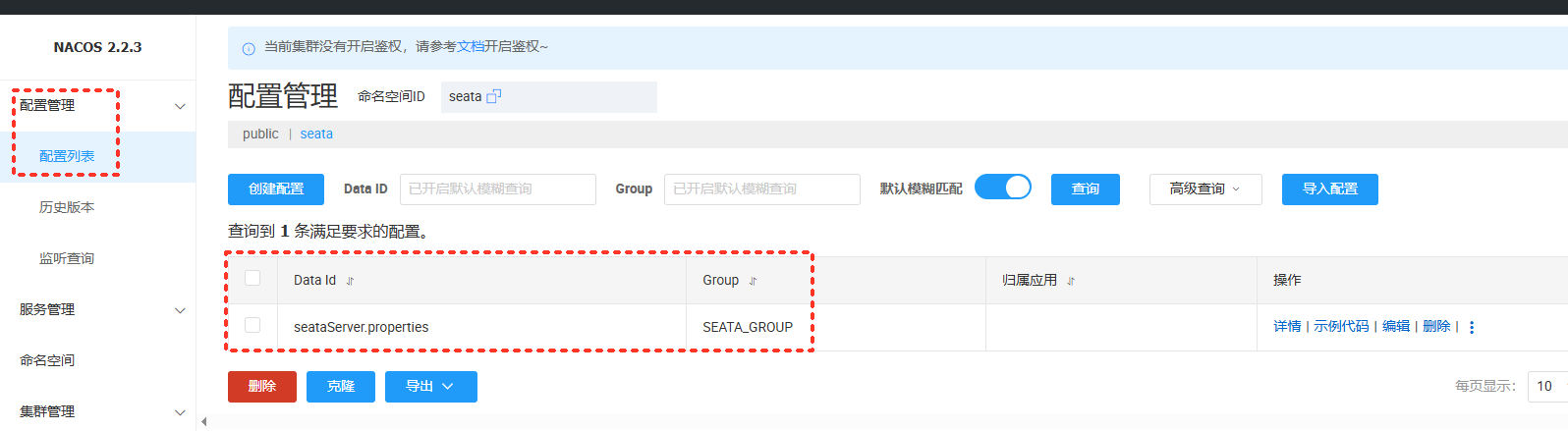
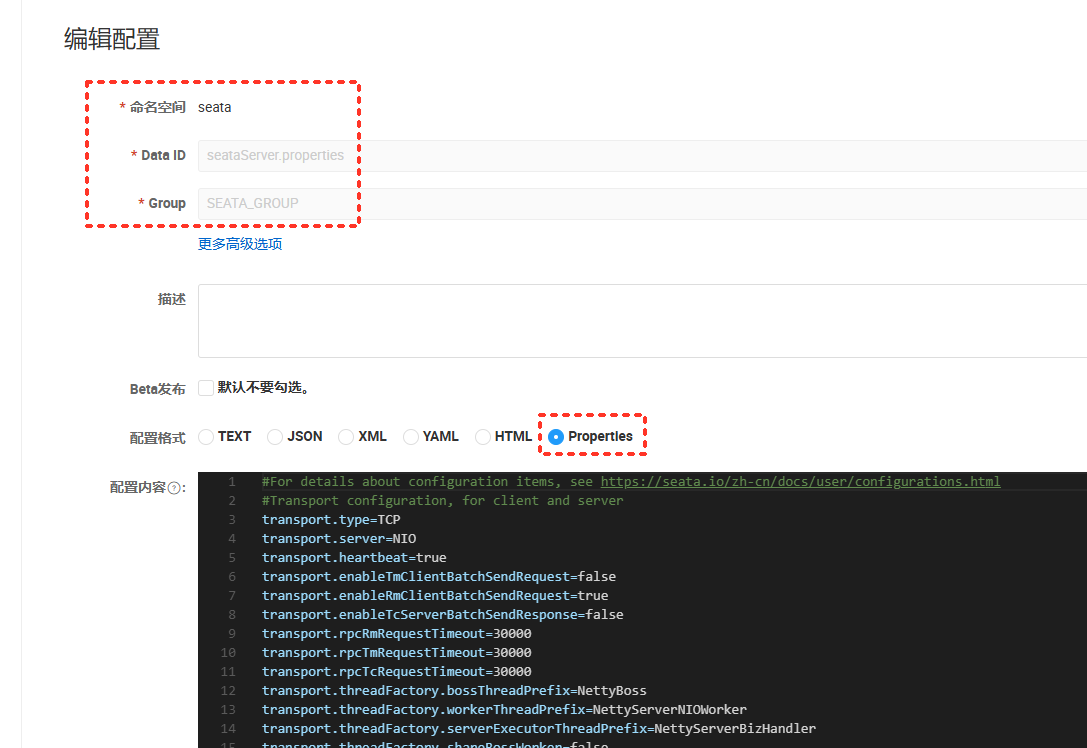
- 配置文件内容
#For details about configuration items, see https://seata.io/zh-cn/docs/user/configurations.html
#Transport configuration, for client and server
transport.type=TCP
transport.server=NIO
transport.heartbeat=true
transport.enableTmClientBatchSendRequest=false
transport.enableRmClientBatchSendRequest=true
transport.enableTcServerBatchSendResponse=false
transport.rpcRmRequestTimeout=30000
transport.rpcTmRequestTimeout=30000
transport.rpcTcRequestTimeout=30000
transport.threadFactory.bossThreadPrefix=NettyBoss
transport.threadFactory.workerThreadPrefix=NettyServerNIOWorker
transport.threadFactory.serverExecutorThreadPrefix=NettyServerBizHandler
transport.threadFactory.shareBossWorker=false
transport.threadFactory.clientSelectorThreadPrefix=NettyClientSelector
transport.threadFactory.clientSelectorThreadSize=1
transport.threadFactory.clientWorkerThreadPrefix=NettyClientWorkerThread
transport.threadFactory.bossThreadSize=1
transport.threadFactory.workerThreadSize=default
transport.shutdown.wait=3
transport.serialization=seata
transport.compressor=none

#Transaction routing rules configuration, only for the client
service.vgroupMapping.default-tx-group=default
service.vgroupMapping.test-tx-group=default

#If you use a registry, you can ignore it
#service.default.grouplist=192.168.80.192:8091
service.enableDegrade=false
service.disableGlobalTransaction=false

#Transaction rule configuration, only for the client
client.rm.asyncCommitBufferLimit=10000
client.rm.lock.retryInterval=10
client.rm.lock.retryTimes=30
client.rm.lock.retryPolicyBranchRollbackOnConflict=true
client.rm.reportRetryCount=5
client.rm.tableMetaCheckEnable=true
client.rm.tableMetaCheckerInterval=60000
client.rm.sqlParserType=druid
client.rm.reportSuccessEnable=false
client.rm.sagaBranchRegisterEnable=false
client.rm.sagaJsonParser=fastjson
client.rm.tccActionInterceptorOrder=-2147482648
client.tm.commitRetryCount=5
client.tm.rollbackRetryCount=5
client.tm.defaultGlobalTransactionTimeout=60000
client.tm.degradeCheck=false
client.tm.degradeCheckAllowTimes=10
client.tm.degradeCheckPeriod=2000
client.tm.interceptorOrder=-2147482648
client.undo.dataValidation=true
client.undo.logSerialization=jackson
client.undo.onlyCareUpdateColumns=true
server.undo.logSaveDays=7
server.undo.logDeletePeriod=86400000
client.undo.logTable=undo_log
client.undo.compress.enable=true
client.undo.compress.type=zip
client.undo.compress.threshold=64k
#For TCC transaction mode
tcc.fence.logTableName=tcc_fence_log
tcc.fence.cleanPeriod=1h

#Log rule configuration, for client and server
log.exceptionRate=100

#Transaction storage configuration, only for the server. The file, db, and redis configuration values are optional.
store.mode=db
store.lock.mode=db
store.session.mode=db
#Used for password encryption
store.publicKey=

#If `store.mode,store.lock.mode,store.session.mode` are not equal to `file`, you can remove the configuration block.
store.file.dir=file_store/data
store.file.maxBranchSessionSize=16384
store.file.maxGlobalSessionSize=512
store.file.fileWriteBufferCacheSize=16384
store.file.flushDiskMode=async
store.file.sessionReloadReadSize=100

#These configurations are required if the `store mode` is `db`. If `store.mode,store.lock.mode,store.session.mode` are not equal to `db`, you can remove the configuration block.
store.db.datasource=druid
store.db.dbType=mysql
store.db.driverClassName=com.mysql.jdbc.Driver
store.db.url=jdbc:mysql://192.168.80.192:3306/db_seata?useUnicode=true&rewriteBatchedStatements=true
store.db.user=root
store.db.password=root
store.db.minConn=5
store.db.maxConn=30
store.db.globalTable=global_table
store.db.branchTable=branch_table
store.db.distributedLockTable=distributed_lock
store.db.queryLimit=100
store.db.lockTable=lock_table
store.db.maxWait=5000

#These configurations are required if the `store mode` is `redis`. If `store.mode,store.lock.mode,store.session.mode` are not equal to `redis`, you can remove the configuration block.
store.redis.mode=single
store.redis.single.host=127.0.0.1
store.redis.single.port=6379
store.redis.sentinel.masterName=
store.redis.sentinel.sentinelHosts=
store.redis.sentinel.sentinelPassword=
store.redis.maxConn=10
store.redis.minConn=1
store.redis.maxTotal=100
store.redis.database=0
store.redis.password=
store.redis.queryLimit=100

#Transaction rule configuration, only for the server
server.recovery.committingRetryPeriod=1000
server.recovery.asynCommittingRetryPeriod=1000
server.recovery.rollbackingRetryPeriod=1000
server.recovery.timeoutRetryPeriod=1000
server.maxCommitRetryTimeout=-1
server.maxRollbackRetryTimeout=-1
server.rollbackRetryTimeoutUnlockEnable=false
server.distributedLockExpireTime=10000
server.xaerNotaRetryTimeout=60000
server.session.branchAsyncQueueSize=5000
server.session.enableBranchAsyncRemove=false
server.enableParallelRequestHandle=false

#Metrics configuration, only for the server
metrics.enabled=false
metrics.registryType=compact
metrics.exporterList=prometheus
metrics.exporterPrometheusPort=9898
6、修改配置文件application.yml文件
- 修改文件的位置
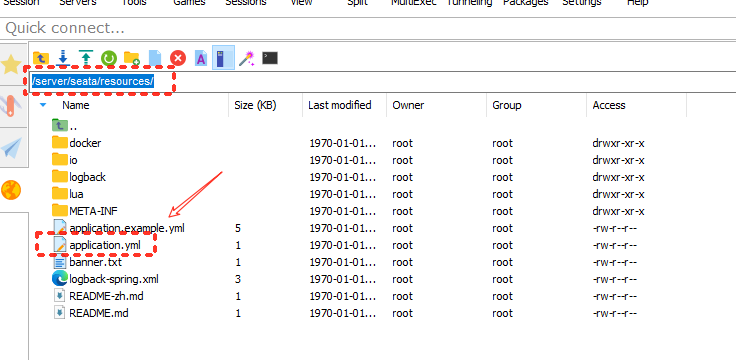
- 修改前
#  Copyright 1999-2019 Seata.io Group.
#
#  Licensed under the Apache License, Version 2.0 (the "License");
#  you may not use this file except in compliance with the License.
#  You may obtain a copy of the License at
#
#  http://www.apache.org/licenses/LICENSE-2.0
#
#  Unless required by applicable law or agreed to in writing, software
#  distributed under the License is distributed on an "AS IS" BASIS,
#  WITHOUT WARRANTIES OR CONDITIONS OF ANY KIND, either express or implied.
#  See the License for the specific language governing permissions and
#  limitations under the License.

server:
  port: 7091

spring:
  application:
    name: seata-server

logging:
  config: classpath:logback-spring.xml
  file:
    path: ${log.home:${user.home}/logs/seata}
  extend:
    logstash-appender:
      destination: 127.0.0.1:4560
    kafka-appender:
      bootstrap-servers: 127.0.0.1:9092
      topic: logback_to_logstash

console:
  user:
    username: seata
    password: seata
seata:
  config:
    # support: nacos, consul, apollo, zk, etcd3
    type: file
  registry:
    # support: nacos, eureka, redis, zk, consul, etcd3, sofa
    type: file
  store:
    # support: file 、 db 、 redis
    mode: file
#  server:
#    service-port: 8091 #If not configured, the default is '${server.port} + 1000'
  security:
    secretKey: SeataSecretKey0c382ef121d778043159209298fd40bf3850a017
    tokenValidityInMilliseconds: 1800000
    ignore:
      urls: /,/**/*.css,/**/*.js,/**/*.html,/**/*.map,/**/*.svg,/**/*.png,/**/*.jpeg,/**/*.ico,/api/v1/auth/login
- 修改后
server:
  port: 7091

spring:
  application:
    name: seata-server

logging:
  config: classpath:logback-spring.xml
  file:
    path: ${log.home:${user.home}/logs/seata}
  extend:
    logstash-appender:
      destination: 127.0.0.1:4560
    kafka-appender:
      bootstrap-servers: 127.0.0.1:9092
      topic: logback_to_logstash
console:
  user:
    username: seata
    password: seata
seata:
  store:
    # support: file 、 db 、 redis
    mode: db
  config:
    # support: nacos, consul, apollo, zk, etcd3
    type: nacos
    nacos:
      server-addr: 192.168.80.192:8848
      namespace: seata
      group: SEATA_GROUP
      username: nacos
      password: nacos
      context-path:
      ##if use MSE Nacos with auth, mutex with username/password attribute
      #access-key:
      #secret-key:
      data-id: seataServer.properties
  registry:
    # support: nacos, eureka, redis, zk, consul, etcd3, sofa
    type: nacos
    nacos:
      application: seata-server
      server-addr: 192.168.80.192:8848
      group: SEATA_GROUP
      namespace: seata
      cluster: default
      username: nacos
      password: nacos
      context-path:
      ##if use MSE Nacos with auth, mutex with username/password attribute
      #access-key:
      #secret-key:
  security:
    secretKey: SeataSecretKey0c382ef121d778043159209298fd40bf3850a017
    tokenValidityInMilliseconds: 1800000
    ignore:
      urls: /,/**/*.css,/**/*.js,/**/*.html,/**/*.map,/**/*.svg,/**/*.png,/**/*.jpeg,/**/*.ico,/api/v1/auth/login
7、初始化数据库
数据库脚本地址:
https://github.com/apache/incubator-seata/tree/1.8.0/script/server/db
下载mysql的脚本即可。脚本内容如下:
-- -------------------------------- The script used when storeMode is 'db' --------------------------------
-- the table to store GlobalSession data
CREATE TABLE IF NOT EXISTS `global_table`
(
    `xid`                       VARCHAR(128) NOT NULL,
    `transaction_id`            BIGINT,
    `status`                    TINYINT      NOT NULL,
    `application_id`            VARCHAR(32),
    `transaction_service_group` VARCHAR(32),
    `transaction_name`          VARCHAR(128),
    `timeout`                   INT,
    `begin_time`                BIGINT,
    `application_data`          VARCHAR(2000),
    `gmt_create`                DATETIME,
    `gmt_modified`              DATETIME,
    PRIMARY KEY (`xid`),
    KEY `idx_status_gmt_modified` (`status` , `gmt_modified`),
    KEY `idx_transaction_id` (`transaction_id`)
) ENGINE = InnoDB
  DEFAULT CHARSET = utf8mb4;

-- the table to store BranchSession data
CREATE TABLE IF NOT EXISTS `branch_table`
(
    `branch_id`         BIGINT       NOT NULL,
    `xid`               VARCHAR(128) NOT NULL,
    `transaction_id`    BIGINT,
    `resource_group_id` VARCHAR(32),
    `resource_id`       VARCHAR(256),
    `branch_type`       VARCHAR(8),
    `status`            TINYINT,
    `client_id`         VARCHAR(64),
    `application_data`  VARCHAR(2000),
    `gmt_create`        DATETIME(6),
    `gmt_modified`      DATETIME(6),
    PRIMARY KEY (`branch_id`),
    KEY `idx_xid` (`xid`)
) ENGINE = InnoDB
  DEFAULT CHARSET = utf8mb4;

-- the table to store lock data
CREATE TABLE IF NOT EXISTS `lock_table`
(
    `row_key`        VARCHAR(128) NOT NULL,
    `xid`            VARCHAR(128),
    `transaction_id` BIGINT,
    `branch_id`      BIGINT       NOT NULL,
    `resource_id`    VARCHAR(256),
    `table_name`     VARCHAR(32),
    `pk`             VARCHAR(36),
    `status`         TINYINT      NOT NULL DEFAULT '0' COMMENT '0:locked ,1:rollbacking',
    `gmt_create`     DATETIME,
    `gmt_modified`   DATETIME,
    PRIMARY KEY (`row_key`),
    KEY `idx_status` (`status`),
    KEY `idx_branch_id` (`branch_id`),
    KEY `idx_xid` (`xid`)
) ENGINE = InnoDB
  DEFAULT CHARSET = utf8mb4;

CREATE TABLE IF NOT EXISTS `distributed_lock`
(
    `lock_key`       CHAR(20) NOT NULL,
    `lock_value`     VARCHAR(20) NOT NULL,
    `expire`         BIGINT,
    primary key (`lock_key`)
) ENGINE = InnoDB
  DEFAULT CHARSET = utf8mb4;

INSERT INTO `distributed_lock` (lock_key, lock_value, expire) VALUES ('AsyncCommitting', ' ', 0);
INSERT INTO `distributed_lock` (lock_key, lock_value, expire) VALUES ('RetryCommitting', ' ', 0);
INSERT INTO `distributed_lock` (lock_key, lock_value, expire) VALUES ('RetryRollbacking', ' ', 0);
INSERT INTO `distributed_lock` (lock_key, lock_value, expire) VALUES ('TxTimeoutCheck', ' ', 0);

- global_table:全局事务表,每当有一个全局事务发起后,就会在该表中记录全局事务的ID
- branch_table:分支事务表,记录每一个分支事务的ID,分支事务操作的哪个数据库等信息
- lock_table:全局锁
- distributed_lock:分布式锁
8、创建Seata容器
docker run -d \
--name seata \
-p 8091:8091 \
-p 7091:7091 \
-e SEATA_IP=192.168.80.192 \
-v /server/seata/resources:/seata-server/resources \
seataio/seata-server:1.8.0
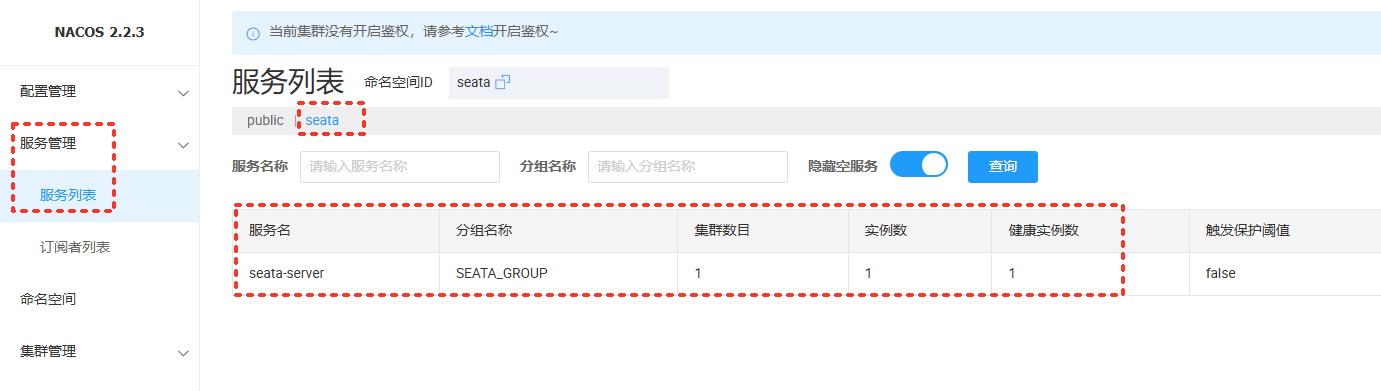
- SEATA_IP=192.168.80.192 这个选项很重要,是设置seata服务器ip,否则客户端会连接docker内部ip,导致连接不成功。

运行成功后,在nacos注册中心可以看到下面信息:
9、cloud项目的application.yml
server:
  port: 9092
spring:
  application:
    name: server-turn
  profiles:
    # 环境配置
    active: dev
  cloud:
    nacos:
      discovery:
        # 服务注册地址
        server-addr: 192.168.80.192:8848
        namespace: public  # 你的命名空间
        group: DEFAULT_GROUP  # 你的分组
  datasource:
    driver-class-name: com.mysql.cj.jdbc.Driver
    url: jdbc:mysql://192.168.80.192:3306/db_shop_demo?serverTimezone=GMT%2B8&useSSL=false&useUnicode=true&characterEncoding=utf8
    username: root
    password: root
    druid:
      initial-size: 5
      min-idle: 5
      maxActive: 20
      maxWait: 60000
      connectTimeout: 30000
      socketTimeout: 60000
      timeBetweenEvictionRunsMillis: 60000
      minEvictableIdleTimeMillis: 300000
      validationQuery: SELECT 1 FROM DUAL
      testWhileIdle: true
      testOnBorrow: false
      testOnReturn: false
      poolPreparedStatements: true
      maxPoolPreparedStatementPerConnectionSize: 20
#      filters: stat,slf4j,wall
      connectionProperties: druid.stat.mergeSql\=true;druid.stat.slowSqlMillis\=5000
      # 开启监控统计功能
      filters: stat,wall  # stat: 监控统计, wall: SQL防火墙 [citation:1][citation:2]

      # StatViewServlet配置 (用于访问Druid监控页面)
      # http://localhost:9090/druid/login.html
      stat-view-servlet:
        enabled: true
        login-username: admin      # 监控页面登录用户名
        login-password: admin      # 监控页面登录密码
        url-pattern: /druid/*      # 访问路径
        reset-enable: false        # 是否允许重置统计数据

      # WebStatFilter配置 (用于采集web-jdbc关联监控的数据)
      web-stat-filter:
        enabled: true
        url-pattern: /*
        exclusions: "*.js,*.gif,*.jpg,*.png,*.css,*.ico,/druid/*" # 排除不必要的请求
  #配置json时间格式
  jackson:
    date-format: yyyy-MM-dd HH:mm:ss
    time-zone: GMT+8
# MyBatis配置
mybatis:
  # mapper XML文件的位置
  mapper-locations: classpath:mapper/*.xml
  # 实体类所在的包
  type-aliases-package: com.shenmazong.entity
  configuration:
    # 开启驼峰命名自动转换
    map-underscore-to-camel-case: true

# 日志 (方便调试SQL)
logging:
  level:
    com.shenmazong.mapper: debug
seata:
  enabled: true
  application-id: ${spring.application.name}    # 应用 ID,通常使用服务名
  tx-service-group: test-tx-group                 # 事务服务组名,非常重要,需与 Server 端配置对应
  service:
    vgroupMapping:
      test_tx_group: default
      test-tx-group: default
    grouplist:
      default: 192.168.80.192:8091              # Seata Server 的地址列表
  registry:
    type: nacos                                 # 注册中心类型,也可用 eureka、redis 等
    nacos:
      server-addr: 192.168.80.192:8848
      namespace: seata
      group: SEATA_GROUP
  config:
    type: nacos                                 # 配置中心类型
    nacos:
      cluster-name: default
      server-addr: 192.168.80.192:8848
      namespace: seata
      group: SEATA_GROUP
      data-id: seataServer.properties
      username: nacos
      password: nacos
10、业务数据增加undo_log表
-- 注意此处0.7.0+ 增加字段 context
CREATE TABLE `undo_log` (
  `id` bigint(20) NOT NULL AUTO_INCREMENT,
  `branch_id` bigint(20) NOT NULL,
  `xid` varchar(100) NOT NULL,
  `context` varchar(128) NOT NULL,
  `rollback_info` longblob NOT NULL,
  `log_status` int(11) NOT NULL,
  `log_created` datetime NOT NULL,
  `log_modified` datetime NOT NULL,
  PRIMARY KEY (`id`),
  UNIQUE KEY `ux_undo_log` (`xid`,`branch_id`)
) ENGINE=InnoDB AUTO_INCREMENT=1 DEFAULT CHARSET=utf8;
11、分布式事务代码
需要注意的是,每个微服务,都需要添加seata的依赖和配置,确保已经连上了seata服务器。
package com.shenmazong.controller;

import com.shenmazong.service.IJianSheService;
import com.shenmazong.service.INongYeService;
import io.seata.spring.annotation.GlobalTransactional;
import org.springframework.beans.factory.annotation.Autowired;
import org.springframework.transaction.annotation.Transactional;
import org.springframework.web.bind.annotation.PostMapping;
import org.springframework.web.bind.annotation.RequestMapping;
import org.springframework.web.bind.annotation.RestController;

/**
 * @author 军哥
 * @version 1.0
 * @description: TODO
 * @date 2026/3/9 16:23
 */

@RestController
@RequestMapping("/turn")
public class TurnController {

    @Autowired
    IJianSheService iJianSheService;

    @Autowired
    INongYeService iNongYeService;

    /**
     * @description 模拟张三给李四进行跨行转账
     * @params []
     * @return java.lang.Object
     * @author 军哥
     * @date 2026/3/11 14:38
     */
    @PostMapping("/jiansheTurnNongYe")
//    @Transactional(rollbackFor = Exception.class)
    @GlobalTransactional(name = "turn-money-transaction", rollbackFor = Exception.class)
    public Object jiansheTurnNongYe() {
        // 使用OpenFeign调用建设银行转账接口,扣除张三1000元
        iJianSheService.jiansheTurnMoney(1, -1000.00f);

        // 使用OpenFeign调用农业银行转账接口,李四的账户添加1000元
        iNongYeService.nongyeTurnMoney(1, 1000.00f);

        return "success";
    }

}
